First time at MonkeyTaco? This post builds on concepts from Part 8 — Decision Logic and Part 9 — Scheduling. You don’t need to read them first — but the threading concept here will feel more natural if you’ve seen the state machine and scheduler in action.
Let’s start with an honest question.
In the last post, we ran into a surprisingly common problem: two loops, one program, and only one of them actually ran. The fix was straightforward — merge everything into a single main loop. But that solution came with an implicit assumption: that one loop is enough.
What happens when it isn’t?
Imagine a real hospital room monitoring system running simultaneously:
- Checking Patient A’s medication schedule every few hours
- Monitoring Patient B’s posture every 30 minutes
- Watching the door to ensure the room doesn’t exceed capacity
- Staying alert for anyone who falls
In our single-loop approach from Post 9, all of these would need to share the same camera frame cycle — roughly 30 times per second. That works fine when everything is event-driven. But what about tasks that run on completely independent timelines? A medication check doesn’t care about camera frames. A posture reminder doesn’t need to wait for a hand gesture.
This is where threading enters the picture.

What Is Threading?
Python’s threading library lets a program run multiple tasks simultaneously — not one after another, but genuinely at the same time, like different workers doing different jobs in the same room.
Here’s the simplest possible demonstration. Normally, if you call two functions in sequence:
print_letters()   # A B C D E
print_numbers()   # 1 2 3 4 5
The letters finish completely before the numbers start. Output: A B C D E 1 2 3 4 5.
With threading:
import threading
import time

def print_letters():
    for letter in ['A', 'B', 'C', 'D', 'E']:
        time.sleep(0.5)
        print(f"Letters: {letter}")

def print_numbers():
    for number in range(1, 6):
        time.sleep(0.5)
        print(f"Numbers: {number}")

t1 = threading.Thread(target=print_letters)
t2 = threading.Thread(target=print_numbers)

t1.start()
t2.start()

t1.join()   # Wait for t1 to finish
t2.join()   # Wait for t2 to finish

print("Both done.")
Output becomes something like: Letters: A → Numbers: 1 → Letters: B → Numbers: 2 ...
Two tasks, running in parallel, interleaving naturally. Neither waits for the other.
That’s threading. And it’s exactly what we need for a hospital room simulation with multiple independent monitoring tasks.
What We’re Building
A Python simulation of a hospital room — no camera, no webcam, no hardware. Everything is code.
Why simulate instead of using the real camera system?
Because simulation lets us test every possible scenario in seconds:
- Patient falls at 3am — does the alert fire immediately?
- Room hits capacity and a fifth person tries to enter — does the warning trigger?
- Medication reminder fires during an active nurse call — does priority logic work?
Testing these scenarios with a real camera would require actors, specific timing, and a lot of patience. With simulation, you write time.sleep(2) and the scenario plays out instantly.
This is how real robotics engineers work — simulate first, deploy later.
The Code
Create a new Python file called hospitalSim.py. No new libraries needed — threading and time are both built into Python.
import threading
import time
from datetime import datetime

# ── Room Management ──────────────────────────────────────────────────

class HospitalRoom:
    """
    Tracks occupancy and enforces capacity limits.
    Uses a threading Lock to prevent race conditions
    when multiple threads try to update occupancy simultaneously.
    """
    def __init__(self, room_name="Room A", max_capacity=3):
        self.room_name    = room_name
        self.max_capacity = max_capacity
        self.occupants    = []
        self.lock         = threading.Lock()

    def patient_enters(self, name):
        with self.lock:
            if len(self.occupants) >= self.max_capacity:
                print(f"[ROOM] CAPACITY WARNING — {self.room_name} is full "
                      f"({self.max_capacity}/{self.max_capacity}). "
                      f"{name} cannot enter.")
            else:
                self.occupants.append(name)
                print(f"[ROOM] {name} entered {self.room_name}. "
                      f"Occupancy: {len(self.occupants)}/{self.max_capacity}")

    def patient_leaves(self, name):
        with self.lock:
            if name in self.occupants:
                self.occupants.remove(name)
                print(f"[ROOM] {name} left {self.room_name}. "
                      f"Occupancy: {len(self.occupants)}/{self.max_capacity}")

    def fall_detected(self, name):
        print(f"\n[!! ALERT !!] FALL DETECTED — {name} in {self.room_name}! "
              f"Dispatching nurse immediately.\n")


# ── Patient Monitoring Threads ───────────────────────────────────────

def monitor_medication(patient_name, scheduled_hours, check_interval_sec=5):
    """
    Simulates medication schedule monitoring.
    In a real system, check_interval_sec would be 3600 (1 hour).
    For simulation, we use 5 seconds to represent 1 hour.
    """
    print(f"[MEDICATION] Started monitoring {patient_name} "
          f"— scheduled doses at: {scheduled_hours}")

    simulated_hour = 0
    while True:
        time.sleep(check_interval_sec)
        simulated_hour += 1

        if simulated_hour in scheduled_hours:
            print(f"[MEDICATION] Reminder: {patient_name} — "
                  f"time for your {simulated_hour}:00 dose.")

        if simulated_hour >= 24:
            simulated_hour = 0   # Reset for next simulated day


def monitor_posture(patient_name, check_interval_sec=8):
    """
    Simulates periodic posture checks.
    In a real system, check_interval_sec would be 1800 (30 minutes).
    """
    print(f"[POSTURE] Started monitoring {patient_name} "
          f"— posture check every {check_interval_sec} seconds (simulated 30 min)")

    check_number = 0
    while True:
        time.sleep(check_interval_sec)
        check_number += 1
        # In a real system, this would trigger the webcam posture check from Post 5
        print(f"[POSTURE] {patient_name} — check #{check_number}: posture OK")


# ── Main Simulation ──────────────────────────────────────────────────

if __name__ == "__main__":

    print("=" * 55)
    print("  MonkeyTaco — Hospital Room Simulation")
    print("  Press Ctrl+C to stop")
    print("=" * 55)

    room = HospitalRoom(room_name="Room 3", max_capacity=3)

    # --- Create monitoring threads ---
    # daemon=True means these threads stop automatically when the main program exits
    thread_med_A = threading.Thread(
        target=monitor_medication,
        args=("Patient A", [8, 12, 18]),
        daemon=True
    )
    thread_posture_B = threading.Thread(
        target=monitor_posture,
        args=("Patient B",),
        daemon=True
    )

    thread_med_A.start()
    thread_posture_B.start()

    # --- Simulate room events ---
    time.sleep(1)
    room.patient_enters("Patient A")

    time.sleep(1)
    room.patient_enters("Patient B")

    time.sleep(2)
    room.patient_enters("Patient C")    # Room now at capacity

    time.sleep(2)
    room.fall_detected("Patient B")     # Fall alert

    time.sleep(2)
    room.patient_enters("Patient D")    # Should trigger capacity warning

    time.sleep(2)
    room.patient_leaves("Patient C")    # Someone leaves

    time.sleep(1)
    room.patient_enters("Patient D")    # Now there's room

    # --- Keep running so background threads continue ---
    try:
        while True:
            time.sleep(1)
    except KeyboardInterrupt:
        print("\n[INFO] Simulation stopped.")
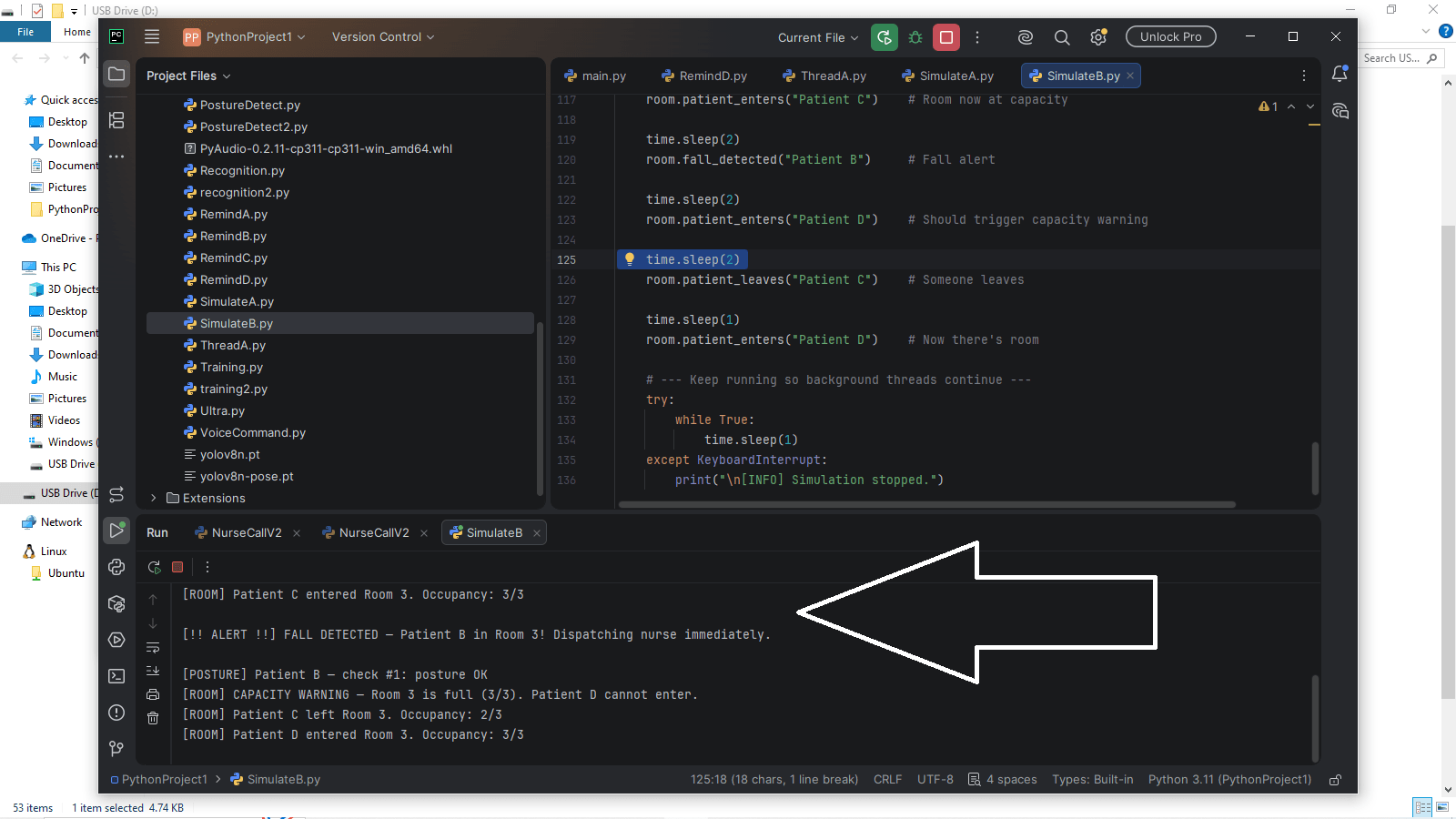
Hit Run. You’ll see the room events play out in the terminal — occupancy updates, the capacity warning when Patient D tries to enter, the fall alert, medication reminders, and posture checks — all interleaving naturally as the threads run in parallel.
Three Things Worth Understanding
1. The Lock
self.lock = threading.Lock()

def patient_enters(self, name):
    with self.lock:
        ...
When multiple threads access the same data simultaneously, they can interfere with each other in subtle ways. Imagine two threads both trying to update self.occupants at the exact same millisecond — one might read stale data, producing incorrect occupancy counts.
A Lock prevents this. Only one thread can execute the with self.lock: block at a time. The others wait their turn. It’s a brief pause — microseconds — but it guarantees the data stays consistent.
Think of it like a single-stall bathroom with a lock on the door. One person at a time. Everyone else waits outside.
2. daemon=True
thread_med_A = threading.Thread(..., daemon=True)Without this, background threads keep running even after the main program tries to exit — and the program appears to hang. daemon=True tells Python: “These threads are support workers. When the main program is done, shut them down automatically.”
3. Simulated time
# check_interval_sec=5 represents 1 hour in simulationThe simulation runs medication checks every 5 seconds instead of every hour. This is standard practice in software development — compress time during testing so you can verify behavior in seconds rather than hours. When deploying for real, change 5 to 3600.
What This Actually Demonstrates
Look at what’s happening in that terminal output:
- The room occupancy system responds to events as they’re triggered
- The medication monitor runs on its own schedule, independent of everything else
- The posture checker runs on yet another schedule, also independent
- The fall alert fires immediately when triggered, interrupting nothing
- All four run simultaneously without any of them blocking the others
This is the architecture of a real patient monitoring system. Not a simplified version — the actual structure. Individual monitoring tasks run as independent threads. A central room object manages shared state. Events trigger immediate responses while scheduled tasks continue in the background.
Our version simulates it in a terminal. A production system would replace time.sleep() with real sensor data and replace print() with network messages to a nursing station. The threading architecture? Identical.
The Honest Limitation
Threading in Python has a well-known constraint called the Global Interpreter Lock (GIL) — which means Python threads don’t truly run in parallel on multiple CPU cores for CPU-intensive tasks. For our use case (waiting, I/O, sensor polling), this doesn’t matter — our threads spend most of their time sleeping or waiting, not computing. But it’s worth knowing the limitation exists if you ever push into high-performance territory.
For everything we’re doing at MonkeyTaco, threading works exactly as advertised.
What’s Next?
Our simulation runs entirely in a terminal — text output only. The next step is giving the robot a real voice: not a pre-recorded .mp3 file, but dynamically generated speech that can say anything — patient names, room numbers, elapsed time, whatever the situation requires.
Part 11 — Text-to-Speech: Give Your Robot a Voice for Free adds that capability, and connects it back into everything we’ve built — the state machine, the scheduler, and now the simulation.
MonkeyTaco — Serious Robots. Zero Budget. Maximum Chaos.