First time at MonkeyTaco? This post builds directly on Part 7 — Building a Virtual Nurse Call Button. The code upgrade at the end will make more sense if you’ve seen that project — but the concepts here stand on their own.
The Robot That Couldn’t Make Up Its Mind
Cast your mind back to our Nurse Call system from the last post.
It worked. Raise your hand — alert triggers. Lower your hand — alert stops. Simple, clean, satisfying.
But spend five minutes actually using it and a few awkward moments start to emerge.
You raise your hand to call the nurse. The alert fires. Then your arm gets tired and drops slightly — just for a second — and the alert cuts out. You raise it again. Alert fires again. Drop slightly. Cuts out. The system is flickering on and off based purely on where your wrist is right now, with no awareness of what happened five seconds ago.
Or consider this: you’ve been holding your hand up for thirty seconds. No response. Is anyone coming? The system has no idea. It’s just… watching your wrist. Loyally. Uselessly.
The problem isn’t the detection. The detection works fine. The problem is that the robot has no memory. No sense of context. No concept of “we’ve been in this situation for a while and something should change.”
In other words: the robot can sense. But it can’t really think.
Traffic Lights Know More Than You Think
Here’s something worth pausing on.
A traffic light seems like one of the simplest machines imaginable. Red, green, yellow. Repeat. What’s to think about?
But watch a modern traffic system carefully — especially one with sensors embedded in the road — and you’ll notice something. At 3am on an empty street, the green light stays green for a long time. The system detects no cross-traffic, no pedestrians, so it holds the state that keeps things moving.
During rush hour, the same intersection behaves completely differently. Lights cycle faster. The system detects high density in multiple directions and adjusts its timing accordingly. It’s not just switching colors on a fixed schedule — it’s responding to context and deciding how long to stay in each state before transitioning to the next one.
That traffic light is running a State Machine.
Not because it’s particularly intelligent. But because someone designed it to:
- Know which state it’s currently in (RED / GREEN / YELLOW)
- Know what conditions cause a transition to the next state
- Know what actions belong to each state
- Remember how long it’s been in the current state
That’s it. Four things. And with just those four things, you get behavior that actually makes sense in the real world.
What Is a State Machine?
A State Machine is a way of organizing behavior into a set of clearly defined states, with rules about when and how to move between them.
Every state answers three questions:
- What is the system currently doing?
- What is it watching for?
- What happens next, and when?
The classic everyday example: an elevator.
| State | What it’s doing | Transition condition | Next state |
|---|---|---|---|
| IDLE | Waiting at a floor | Button pressed | MOVING |
| MOVING | Traveling to floor | Destination reached | ARRIVED |
| ARRIVED | Doors opening | Doors fully open | OPEN |
| OPEN | Doors open | Timer expired OR close button | CLOSING |
| CLOSING | Doors closing | Doors fully closed | IDLE |
The elevator doesn’t just react to the current moment. It knows where it is in a sequence, and it behaves appropriately for that position in the sequence. That’s the key insight.
Now let’s apply this to something we’ve already built.
The Nurse Call State Machine
Our current Nurse Call system has exactly one behavior: watch the wrist. That’s not a state machine — that’s a switch.
A proper Nurse Call system needs three states:
MONITORING — Normal operation. Watching for a hand raise. Nothing alarming is happening.
ALERT — A hand raise has been detected and confirmed. The alarm is active. The system is counting how long the alert has been running.
COOLDOWN — The hand has been lowered. The alert is winding down. We give it a few seconds before returning to normal, to avoid flickering.
And crucially — in the ALERT state, the system should escalate if the alert has been running for too long with no response. Because a patient who has been holding their arm up for 30 seconds with no sign of help is a different situation than one who just raised it.
Here’s the state diagram:
MONITORING
    │
    │ hand raised (confirmed)
    ▼
  ALERT ──────────────────────── alert > 30 sec ──► ESCALATED
    │                                                    │
    │ hand lowered                                       │ hand lowered
    ▼                                                    ▼
COOLDOWN ◄──────────────────────────────────────────────┘
    │
    │ cooldown timer expires
    ▼
MONITORING
Four states. Clear transitions. Each state knows what it’s doing and what it’s watching for.
The Upgraded Code
This is the same Nurse Call system from Post 7 — same detection logic, same YOLOv8-pose model — but now built around a proper state machine.
Create a new file called nurseCallV2.py:
import cv2
import time
import pygame
from ultralytics import YOLO
from enum import Enum

# --- State definition ---
class State(Enum):
    MONITORING = "MONITORING"
    ALERT      = "ALERT"
    ESCALATED  = "ESCALATED"
    COOLDOWN   = "COOLDOWN"

# --- Initialize ---
pygame.mixer.init()
model = YOLO("yolov8n-pose.pt")

# --- Settings ---
ALERT_SOUND     = "alarm.mp3"     # Replace with your audio file
CONFIDENCE      = 0.5             # Minimum keypoint confidence
RAISE_MARGIN    = 0.05            # How far above shoulder wrist must be
COOLDOWN_SECS   = 4.0             # Cooldown duration before returning to MONITORING
ESCALATE_SECS   = 30.0            # Seconds in ALERT before escalating

# Keypoint indices
LEFT_SHOULDER  = 5
RIGHT_SHOULDER = 6
LEFT_WRIST     = 9
RIGHT_WRIST    = 10

cap = cv2.VideoCapture(0)
if not cap.isOpened():
    print("Cannot open webcam")
    exit()

# --- State machine variables ---
current_state    = State.MONITORING
state_start_time = time.time()

print("MonkeyTaco Nurse Call v2 running... Press 'q' to quit")


def is_hand_raised(keypoints):
    l_shoulder = keypoints[LEFT_SHOULDER]
    r_shoulder = keypoints[RIGHT_SHOULDER]
    l_wrist    = keypoints[LEFT_WRIST]
    r_wrist    = keypoints[RIGHT_WRIST]

    if l_wrist[2] > CONFIDENCE and l_shoulder[2] > CONFIDENCE:
        if l_wrist[1] < (l_shoulder[1] - RAISE_MARGIN):
            return True
    if r_wrist[2] > CONFIDENCE and r_shoulder[2] > CONFIDENCE:
        if r_wrist[1] < (r_shoulder[1] - RAISE_MARGIN):
            return True
    return False


def transition_to(new_state):
    """Move to a new state and record when we entered it."""
    global current_state, state_start_time
    print(f"[STATE] {current_state.value} → {new_state.value}")
    current_state    = new_state
    state_start_time = time.time()


def time_in_state():
    """How many seconds have we been in the current state?"""
    return time.time() - state_start_time


while True:
    ret, frame = cap.read()
    if not ret:
        break

    results  = model(frame, verbose=False)
    hand_up  = False

    if results[0].keypoints is not None and len(results[0].keypoints.data) > 0:
        for person_kp in results[0].keypoints.data.cpu().numpy():
            if is_hand_raised(person_kp):
                hand_up = True
                break

    # ── State machine logic ──────────────────────────────────────────
    if current_state == State.MONITORING:
        if hand_up:
            transition_to(State.ALERT)
            pygame.mixer.music.load(ALERT_SOUND)
            pygame.mixer.music.play()

    elif current_state == State.ALERT:
        if not hand_up:
            transition_to(State.COOLDOWN)
            pygame.mixer.music.stop()
        elif time_in_state() > ESCALATE_SECS:
            transition_to(State.ESCALATED)
            # Could trigger a louder alarm, send a network message, etc.

    elif current_state == State.ESCALATED:
        if not hand_up:
            transition_to(State.COOLDOWN)
            pygame.mixer.music.stop()

    elif current_state == State.COOLDOWN:
        if hand_up:
            # Hand raised again during cooldown — back to ALERT immediately
            transition_to(State.ALERT)
            pygame.mixer.music.load(ALERT_SOUND)
            pygame.mixer.music.play()
        elif time_in_state() > COOLDOWN_SECS:
            transition_to(State.MONITORING)
    # ────────────────────────────────────────────────────────────────

    # --- Display ---
    annotated_frame = results[0].plot()
    elapsed = time_in_state()

    if current_state == State.MONITORING:
        color = (0, 200, 0)
        label = "Status: Monitoring"
        timer_text = ""

    elif current_state == State.ALERT:
        color = (0, 0, 255)
        label = "** NURSE CALL — HAND RAISED **"
        timer_text = f"Alert active: {elapsed:.0f}s  |  Escalates in: {max(0, ESCALATE_SECS - elapsed):.0f}s"

    elif current_state == State.ESCALATED:
        color = (0, 0, 200)
        label = "!! ESCALATED — NO RESPONSE AFTER 30s !!"
        timer_text = f"Escalated for: {elapsed:.0f}s"

    elif current_state == State.COOLDOWN:
        color = (0, 165, 255)
        label = "Alert clearing..."
        timer_text = f"Returning to monitoring in: {max(0, COOLDOWN_SECS - elapsed):.1f}s"

    cv2.putText(annotated_frame, label,
                (30, 60), cv2.FONT_HERSHEY_SIMPLEX, 0.9, color, 2)
    if timer_text:
        cv2.putText(annotated_frame, timer_text,
                    (30, 100), cv2.FONT_HERSHEY_SIMPLEX, 0.65, color, 2)
    cv2.putText(annotated_frame, f"State: {current_state.value}",
                (30, annotated_frame.shape[0] - 20),
                cv2.FONT_HERSHEY_SIMPLEX, 0.6, (200, 200, 200), 1)

    cv2.imshow("MonkeyTaco — Nurse Call v2", annotated_frame)

    if cv2.waitKey(1) & 0xFF == ord("q"):
        break

cap.release()
cv2.destroyAllWindows()
pygame.mixer.quit()
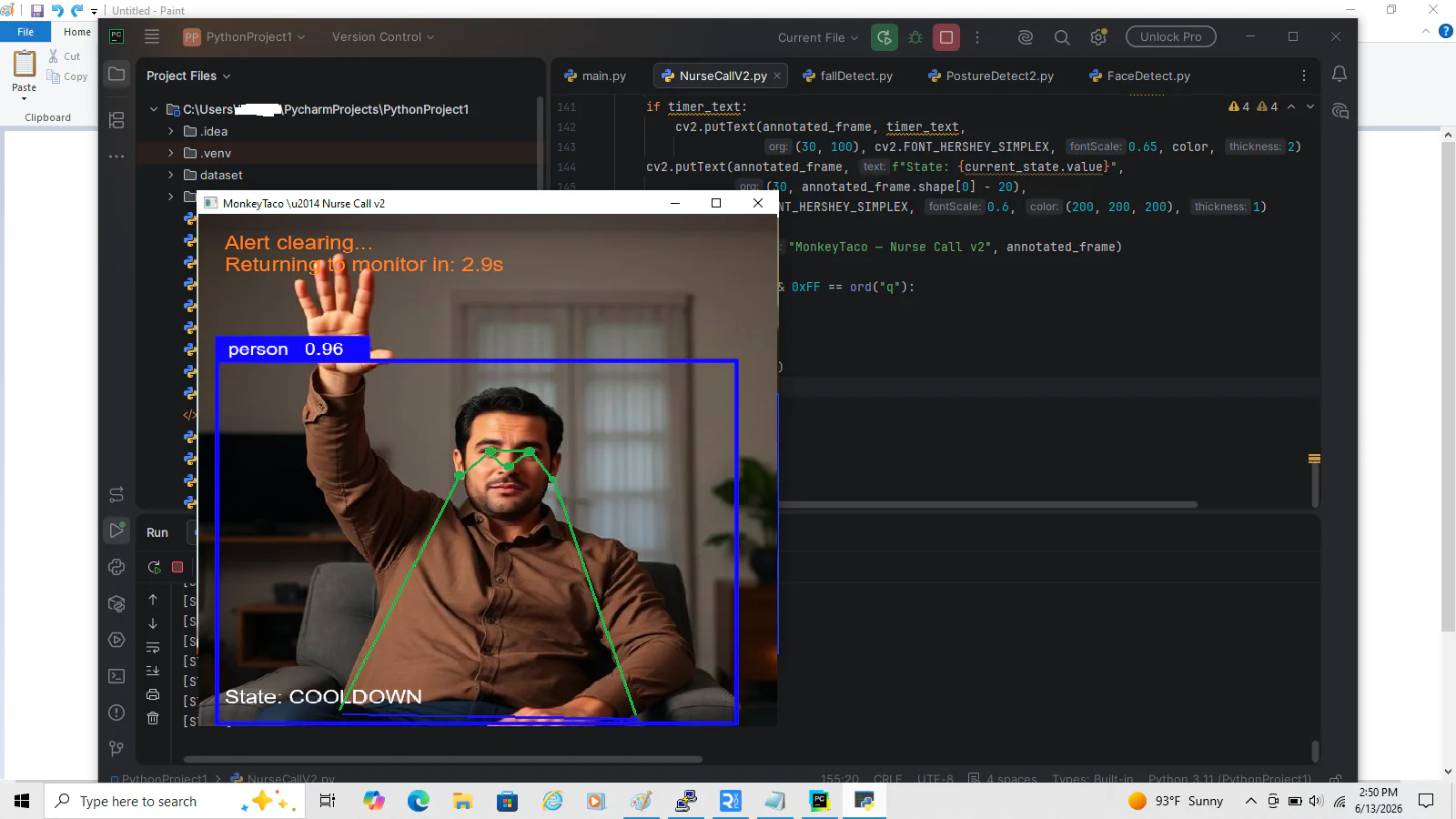
Hit Run and watch the bottom of the screen — you’ll see the current state displayed in real time as you raise and lower your hand. That live state display is what makes the logic tangible: you can see the machine thinking.
Walking Through What Just Changed
class State(Enum)
Instead of a tangle of boolean flags (alert_active, is_cooling_down, is_escalated…), we have one variable — current_state — that always tells us exactly where the system is. Clean and unambiguous.
transition_to(new_state)
Every state change goes through this one function. It updates the state and records the time we entered it. This is how we can ask “how long have we been in this state?” at any point.
time_in_state()
This is what enables the escalation logic. The ALERT state checks this every frame: if we’ve been alerting for more than 30 seconds, something is wrong — transition to ESCALATED. The traffic light equivalent: if this intersection has been red for unusually long with no green anywhere, something has gone wrong with the cycle.
The COOLDOWN re-trigger
If the hand goes up again during cooldown, we jump straight back to ALERT without waiting. This handles the realistic case where a patient raises their hand, lowers it briefly to rest their arm, then raises it again.
The Difference This Makes
Here’s the same scenario, with and without the state machine:
Without state machine (Post 7 version): Patient raises hand → alert. Hand drops 2cm → alert stops. Raises again → alert. Drops again → stops. Nurse sees a flickering alarm light and isn’t sure if it’s a real call or a glitch.
With state machine (this version): Patient raises hand → ALERT state, timer starts. Hand wobbles → state doesn’t change, we’re still in ALERT. 30 seconds pass → ESCALATED, louder alarm, different notification. Patient lowers hand → COOLDOWN, then quietly back to MONITORING.
Same detection. Completely different behavior. Because the robot now has memory, context, and a sense of time.
State Machines Everywhere
Once you see state machines, you see them everywhere in robotics:
- A robot vacuum: IDLE → CLEANING → DOCKING → CHARGING
- A hospital medication dispenser: LOCKED → DISPENSING → CONFIRMING → LOCKED
- An autonomous vehicle: CRUISE → BRAKING → STOPPED → YIELDING → CRUISE
- Our fall detection system from Post 4: STANDING → FALLING → FALLEN → ALERT
Every one of those is a set of states, transitions, and conditions. The hardware changes. The concept doesn’t.
What’s Next?
We’ve now built seven projects and one major concept upgrade — all on a laptop, all for $0. The laptop robot is genuinely capable at this point.
But there’s a ceiling. A fixed camera can only see what’s directly in front of it. It can’t follow a patient down a hallway. It can’t navigate to a different room. It can’t physically do anything in the world.
For that, we need hardware. Specifically, we need a way to give our robot a voice — not just a speaker playing a file, but a system that can generate and speak any text in real time, responding dynamically to what it detects.
Part 9 — Text-to-Speech: Give Your Robot a Voice for Free is exactly that — and it connects directly back into everything we’ve built so far.
MonkeyTaco — Serious Robots. Zero Budget. Maximum Chaos.