First time at MonkeyTaco? This post builds directly on Part 8 — How Robots Think: Decision Logic. You don’t need to read it first — but the state machine code we upgrade here will make more sense if you have.
Here’s a scene that plays out in homes and hospitals everywhere.
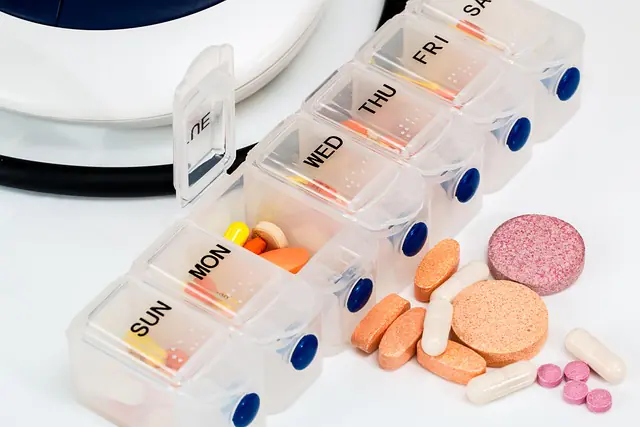
A Weekly Pill Box Organizer — those little plastic containers divided into compartments labeled MON, TUE, WED, THU, FRI, SAT, SUN — sitting on a nightstand next to a glass of water. Simple, low-tech, and genuinely effective. Because the problem it solves is real: patients, especially older adults, forget to take their medication. Not out of carelessness, but because time slips by, routines get disrupted, and nobody is there to remind them.
Now look at the laptop robot we’ve built over the last eight posts. It can see people. It can count them. It can detect falls. It can recognize faces. It can respond when a patient raises their hand. It can escalate alerts that go unanswered.
But it has no concept of time. No sense of “it’s been four hours since the last dose.” No ability to say, unprompted, “Hey — medication time.”
That’s what we fix in this post.
Two Different Kinds of Triggers
Everything we’ve built so far is event-driven — the robot reacts to something it sees. A hand goes up. A person falls. A face appears. The trigger is external.
Medication reminders are different. They’re time-driven — the trigger is internal. Nothing needs to happen in front of the camera. The clock simply reaches a certain point, and the system responds.
In robotics, both types of triggers matter. A robot that only reacts to external events will miss anything that requires proactive behavior. A robot that only runs on a schedule will miss anything that requires situational awareness.
The most capable systems combine both — and that’s exactly what we’re building today.
The Tool: schedule
Python has a library called schedule that makes time-based automation almost embarrassingly readable:
schedule.every(4).hours.do(remind_medication)
schedule.every().day.at("08:00").do(morning_check)
schedule.every(30).minutes.do(posture_check)
That reads like plain English because it basically is. You define what you want to run and when, then call schedule.run_pending() in your main loop — it checks whether anything is due and runs it if so, then immediately returns control. No blocking. No sleeping. No threads required.
Installation
One small note on installation. Use this command:
python3 -m pip install --upgrade scheduleRather than the plain pip install schedule. The reason: depending on your Python environment, the plain pip command can sometimes install an older cached version that’s missing the .every() method — which gives you a confusing AttributeError: module 'schedule' has no attribute 'every' error that has nothing to do with your code.
python3 -m pip ensures you’re installing into exactly the Python environment your project is using.
Part 1: Medication Reminder — Standalone
Before combining anything, let’s build the reminder system on its own and make sure it works.
Create a new Python file called medicationReminder.py:
import time
import pygame
import schedule

# --- Settings ---
REMINDER_INTERVAL = 1             # Minutes between reminders (1 = every minute for testing)
REMINDER_SOUND    = "reminder.mp3"  # Replace with your audio file

pygame.init()
pygame.mixer.init()

def play_reminder():
    try:
        pygame.mixer.music.load(REMINDER_SOUND)
        pygame.mixer.music.play()
        print("[REMINDER] Time to take your medication")
    except pygame.error as e:
        print(f"[AUDIO ERROR] Cannot load {REMINDER_SOUND}: {e}")

# Schedule and fire immediately on startup
schedule.every(REMINDER_INTERVAL).minutes.do(play_reminder)
play_reminder()

print(f"Medication reminder active — every {REMINDER_INTERVAL} minute(s). Press Ctrl+C to quit.")

while True:
    schedule.run_pending()
    time.sleep(1)
Run this. Every minute, the reminder fires. Change REMINDER_INTERVAL to 4 and it fires every 4 hours — ready for real use.
Part 2: The Problem With Two Loops
Now comes the interesting part — and an honest account of what happens when you try to combine this with the Nurse Call system from Post 8 naively.
The first attempt looks logical enough: put the reminder code at the top, the camera code at the bottom, run the file.
# First loop — reminder system
while running:
    schedule.run_pending()
    time.sleep(1)   # ← this is the problem

# Second loop — camera (NEVER REACHED)
while True:
    cap.read()
    ...
Result: the reminder works perfectly. The camera never starts. The program sits in the first loop indefinitely — sleeping for one second, checking the schedule, sleeping again — and the camera code below it never gets a chance to run.
This is one of the most common mistakes when combining independent systems in Python. Each loop assumes it owns the program’s time. Neither is wrong on its own. Together, they block each other completely.
The fix is conceptually simple but easy to miss: there can only be one main loop.
Part 3: One Loop to Rule Them All
The solution is to merge everything into the camera loop — which already runs at roughly 30 frames per second. schedule.run_pending() takes microseconds to execute, so calling it every frame adds no meaningful overhead.
The time.sleep(1) from the standalone reminder? Gone entirely. The camera loop provides all the pacing needed.
Here’s the complete combined system — Nurse Call state machine from Post 8, plus medication reminder, in a single loop:
import cv2
import time
import pygame
from ultralytics import YOLO
from enum import Enum
import schedule

# --- State definition ---
class State(Enum):
    MONITORING = "MONITORING"
    ALERT      = "ALERT"
    ESCALATED  = "ESCALATED"
    COOLDOWN   = "COOLDOWN"

# --- Initialize ---
pygame.init()
pygame.mixer.init()
model = YOLO("yolov8n-pose.pt")

# --- Settings ---
REMINDER_INTERVAL = 1             # Minutes between medication reminders
REMINDER_SOUND    = "reminder.mp3"
ALERT_SOUND       = "alarm.mp3"
CONFIDENCE        = 0.5
RAISE_MARGIN      = 0.05
COOLDOWN_SECS     = 4.0
ESCALATE_SECS     = 30.0

LEFT_SHOULDER  = 5
RIGHT_SHOULDER = 6
LEFT_WRIST     = 9
RIGHT_WRIST    = 10

cap = cv2.VideoCapture(0)
if not cap.isOpened():
    print("Cannot open webcam")
    exit()

current_state    = State.MONITORING
state_start_time = time.time()
reminder_text    = ""
reminder_timer   = 0


def play_audio(sound_file):
    """Load and play an audio file safely."""
    try:
        pygame.mixer.music.load(sound_file)
        pygame.mixer.music.play()
    except pygame.error as e:
        print(f"[AUDIO ERROR] Cannot load {sound_file}: {e}")
        # Common cause: wrong filename or file not in project folder
        # Check your filename carefully — this is the #1 cause of unexpected crashes


def stop_audio():
    try:
        pygame.mixer.music.stop()
    except pygame.error:
        pass


def play_reminder():
    """Scheduled medication reminder — only fires during MONITORING state."""
    global reminder_text, reminder_timer
    if current_state == State.MONITORING:
        play_audio(REMINDER_SOUND)
        reminder_text  = "Medication reminder!"
        reminder_timer = 90        # Show on screen for ~3 seconds at 30fps
        print("[REMINDER] Time to take medication")


def transition_to(new_state):
    global current_state, state_start_time
    print(f"[STATE] {current_state.value} → {new_state.value}")
    current_state    = new_state
    state_start_time = time.time()


def time_in_state():
    return time.time() - state_start_time


def is_hand_raised(keypoints):
    l_shoulder = keypoints[LEFT_SHOULDER]
    r_shoulder = keypoints[RIGHT_SHOULDER]
    l_wrist    = keypoints[LEFT_WRIST]
    r_wrist    = keypoints[RIGHT_WRIST]
    if l_wrist[2] > CONFIDENCE and l_shoulder[2] > CONFIDENCE:
        if l_wrist[1] < (l_shoulder[1] - RAISE_MARGIN):
            return True
    if r_wrist[2] > CONFIDENCE and r_shoulder[2] > CONFIDENCE:
        if r_wrist[1] < (r_shoulder[1] - RAISE_MARGIN):
            return True
    return False


# Schedule reminder and fire once immediately on startup
schedule.every(REMINDER_INTERVAL).minutes.do(play_reminder)
play_reminder()

print("MonkeyTaco — Nurse Call + Scheduler running... Press 'q' to quit")

# ── ONE loop: event-driven (camera) + time-driven (schedule) ─────────
while True:
    ret, frame = cap.read()
    if not ret:
        break

    # Time-driven: check schedule every frame — fast, no blocking
    schedule.run_pending()

    # Event-driven: pose detection
    results = model(frame, verbose=False)
    hand_up = False

    if results[0].keypoints is not None and len(results[0].keypoints.data) > 0:
        for person_kp in results[0].keypoints.data.cpu().numpy():
            if is_hand_raised(person_kp):
                hand_up = True
                break

    # --- State machine ---
    if current_state == State.MONITORING:
        if hand_up:
            transition_to(State.ALERT)
            play_audio(ALERT_SOUND)

    elif current_state == State.ALERT:
        if not hand_up:
            transition_to(State.COOLDOWN)
            stop_audio()
        elif time_in_state() > ESCALATE_SECS:
            transition_to(State.ESCALATED)

    elif current_state == State.ESCALATED:
        if not hand_up:
            transition_to(State.COOLDOWN)
            stop_audio()

    elif current_state == State.COOLDOWN:
        if hand_up:
            transition_to(State.ALERT)
            play_audio(ALERT_SOUND)
        elif time_in_state() > COOLDOWN_SECS:
            transition_to(State.MONITORING)

    # --- Display ---
    annotated_frame = results[0].plot()
    elapsed = time_in_state()

    if current_state == State.MONITORING:
        color      = (0, 200, 0)
        label      = "Status: Monitoring"
        timer_text = ""
    elif current_state == State.ALERT:
        color      = (0, 0, 255)
        label      = "** NURSE CALL — HAND RAISED **"
        timer_text = f"Alert active: {elapsed:.0f}s  |  Escalates in: {max(0, ESCALATE_SECS - elapsed):.0f}s"
    elif current_state == State.ESCALATED:
        color      = (0, 0, 200)
        label      = "!! ESCALATED — NO RESPONSE AFTER 30s !!"
        timer_text = f"Escalated for: {elapsed:.0f}s"
    elif current_state == State.COOLDOWN:
        color      = (0, 165, 255)
        label      = "Alert clearing..."
        timer_text = f"Returning to monitoring in: {max(0, COOLDOWN_SECS - elapsed):.1f}s"

    cv2.putText(annotated_frame, label,
                (30, 60), cv2.FONT_HERSHEY_SIMPLEX, 0.9, color, 2)
    if timer_text:
        cv2.putText(annotated_frame, timer_text,
                    (30, 100), cv2.FONT_HERSHEY_SIMPLEX, 0.65, color, 2)

    if reminder_timer > 0:
        cv2.putText(annotated_frame, reminder_text,
                    (30, 140), cv2.FONT_HERSHEY_SIMPLEX, 0.8, (0, 200, 255), 2)
        reminder_timer -= 1

    cv2.putText(annotated_frame, f"State: {current_state.value}",
                (30, annotated_frame.shape[0] - 20),
                cv2.FONT_HERSHEY_SIMPLEX, 0.6, (200, 200, 200), 1)

    cv2.imshow("MonkeyTaco — Nurse Call + Scheduler", annotated_frame)

    if cv2.waitKey(1) & 0xFF == ord("q"):
        break

cap.release()
cv2.destroyAllWindows()
pygame.mixer.quit()
pygame.quit()
Three Details Worth Noting
1. The reminder respects the state machine
def play_reminder():
    if current_state == State.MONITORING:
        play_audio(REMINDER_SOUND)
If a patient is currently calling for help (ALERT or ESCALATED), the medication reminder stays silent. A nurse call always takes priority over a routine reminder. The state machine isn’t just for display — it’s actively governing behavior across the whole system.
2. play_audio() and stop_audio() are now functions
In earlier posts, audio calls were scattered inline throughout the code. Wrapping them in functions does two things: it makes the state machine logic cleaner to read, and it means error handling lives in one place. If a file is missing or misnamed, you get a clear printed message instead of a silent crash.
Speaking of which —
3. The most common bug in this project
If the alert triggers and the program immediately quits, check your audio filename first. The robot isn’t broken. It just can’t find the file you told it to play. alarm.mp3 and Alarm.mp3 are different filenames. reminder.mp3 and reminder .mp3 (with a trailing space) are different filenames. Check the name, check the folder, check the extension.
Nine times out of ten, it’s a typo. The tenth time, it’s also a typo.
What We Actually Built
Step back and look at what’s running in that single loop:
- Camera reading at 30fps
- Pose estimation on every frame
- State machine governing four distinct behavioral states
- Schedule checker running silently every frame, firing a reminder every N minutes
- Priority logic ensuring nurse calls suppress routine reminders
- Audio management with safe error handling
All of this in one Python file. On a laptop. For $0.
A commercial patient monitoring system with these capabilities — scheduled medication reminders, nurse call detection, escalation logic — would cost thousands of dollars to deploy. Ours runs on whatever hardware you’re already using.

What’s Next?
Our robot monitors, alerts, escalates, and reminds. The next logical question: what if there’s no one watching the screen?
In a real deployment, alerts need to reach people wherever they are — not just display on a monitor in the corner of a room. And responses need to be dynamic, not just a pre-recorded audio file.
That’s where text-to-speech comes in. Instead of playing a fixed .mp3, the robot generates and speaks whatever it needs to say — “Patient in Room 3 has been waiting 47 seconds” — with information that changes in real time.
Part 10 — Simulating a Hospital Room Robot in Python takes a step back first to map out the full logic of everything we’ve built — before Part 11 gives the robot a real voice.
MonkeyTaco — Serious Robots. Zero Budget. Maximum Chaos.