
First time at MonkeyTaco? This post builds on Your Laptop Is Already a Robot and When Your Robot Sees Someone, Make It React. You don’t need to read them first — but if something looks unfamiliar, those are great places to start.
Let’s take stock of where we are.
Our laptop robot can see. It can detect a person, a coffee mug, a cell phone, a dog — 80 different object types, all without spending a single dollar on hardware. And in the last post, we made it react: walk in front of the webcam, and it greets you.
Not bad for something that started as a laptop with a webcam.
But here’s the honest limitation: right now, our robot has exactly one response for everything it sees. Person walks in? “Hello, welcome to MonkeyTaco.” Another person walks in? “Hello, welcome to MonkeyTaco.” A third person, a fourth, a crowd of fifty? Same thing. Same sentence. Every time.
That’s not intelligence. That’s a very enthusiastic parrot.
Time to upgrade.
What We’re Building
In this post, we’re teaching the robot to count — specifically, to count the number of people currently visible in the webcam frame, display that number on screen, and react differently based on how many people it sees.
The practical application we’ll build toward: a waiting room monitor. When the room hits a certain capacity, display a message — “Please wait outside until called.” Simple, real, and surprisingly useful.
Why Counting Is Harder Than It Sounds
Here’s a problem that doesn’t seem obvious at first.
Imagine you’re manually counting people in a waiting room. You’d naturally do something like this:
- Person 1: older man, blue shirt
- Person 2: young woman, red jacket
- Person 3: kid, green backpack
- Person 4: man with a newspaper…
Without realizing it, you’re assigning each person a temporary identity — a set of visual features that distinguishes them from everyone else. That’s how you avoid counting the same person twice when they shift in their seat, stand up, or briefly walk out of your line of sight.
A camera-based counting system has to do the same thing. Without identity tracking, every frame is treated independently — and in 30 frames per second, the same person could be counted 30 times per second.
The solution is called object tracking — assigning each detected person a unique ID that persists across frames. Person #1 is still Person #1 whether they’re sitting, standing, or temporarily blocked by someone walking past.
In our code, we use model.track() instead of plain model() — same YOLOv8 model, but now with tracking enabled. Each person gets an ID. The count stays accurate.
Real-World Applications (More Than You’d Think)
Before we write a line of code, here’s why this “just counts people” feature is worth building:
Retail: Count how many people enter a store vs. how many actually make a purchase. That ratio — the conversion rate — is one of the most important metrics in retail. Also useful for identifying peak hours and staffing accordingly.
Smart Buildings: Automatically adjust lighting and air conditioning based on how many people are in a room. Three people in a conference room vs. thirty people — very different climate needs.
Safety & Crowd Control: Alert staff when a space exceeds safe capacity. Useful for museums, clinics, event venues, and anywhere with a legal occupancy limit.
Healthcare Waiting Rooms: The exact use case we’re building — monitor patient density, display appropriate messages, prevent overcrowding in clinical spaces.
Turns out “just counts people” has quite a few real jobs.
The Code
Create a new Python file in PyCharm — right-click your project folder, select New → Python File, and name it something like countPerson.
Next, open the PyCharm Terminal, and install the necessary libraries:
pip install ultralytics opencv-python
Paste in the following:
import cv2
import time
from ultralytics import YOLO
import pygame

pygame.mixer.init()

# --- Settings ---
SOUND_FILE = "welcome.mp3"        # Your audio file name
TARGET_CLASS_ID = 0               # 0 = "person" in YOLO's COCO dataset
CONFIDENCE_THRESHOLD = 0.60       # Only count detections above 60% confidence
COOLDOWN_SECONDS = 5              # Minimum seconds between audio alerts
MAX_CAPACITY = 3                  # Room capacity limit — adjust as needed

model = YOLO("yolov8n.pt")
cap = cv2.VideoCapture(0)

if not cap.isOpened():
    print("Cannot open webcam")
    exit()

last_alert_time = 0
print("MonkeyTaco People Counter running... Press 'q' to quit")

while True:
    ret, frame = cap.read()
    if not ret:
        break

    # model.track() assigns persistent IDs to each detected person
    # If it crashes on the first frame (no IDs yet), fall back to regular detection
    try:
        results = model.track(frame, persist=True, classes=[TARGET_CLASS_ID])
    except Exception:
        results = model(frame, classes=[TARGET_CLASS_ID])

    person_count = 0
    detected_target = False

    if results[0].boxes is not None and len(results[0].boxes) > 0:
        confidences = results[0].boxes.conf.cpu().numpy()
        person_count = len(confidences)

        for conf in confidences:
            if conf > CONFIDENCE_THRESHOLD:
                detected_target = True
                break

    # Audio alert logic
    current_time = time.time()
    if detected_target:
        if not pygame.mixer.music.get_busy() and (current_time - last_alert_time) > COOLDOWN_SECONDS:
            pygame.mixer.music.load(SOUND_FILE)
            pygame.mixer.music.play()
            last_alert_time = current_time
            print(f"Alert: {person_count} person(s) detected in frame")

    # Draw detections on the frame
    annotated_frame = results[0].plot()

    # Display people count
    cv2.putText(annotated_frame, f"People in room: {person_count}", (10, 50),
                cv2.FONT_HERSHEY_SIMPLEX, 1, (0, 255, 0), 2, cv2.LINE_AA)

    # Display capacity warning if over the limit
    if person_count > MAX_CAPACITY:
        cv2.putText(annotated_frame, "ROOM FULL — Please wait outside", (10, 100),
                    cv2.FONT_HERSHEY_SIMPLEX, 0.85, (0, 0, 255), 2, cv2.LINE_AA)

    cv2.imshow("MonkeyTaco — People Counter", annotated_frame)

    if cv2.waitKey(1) & 0xFF == ord("q"):
        break

cap.release()
cv2.destroyAllWindows()
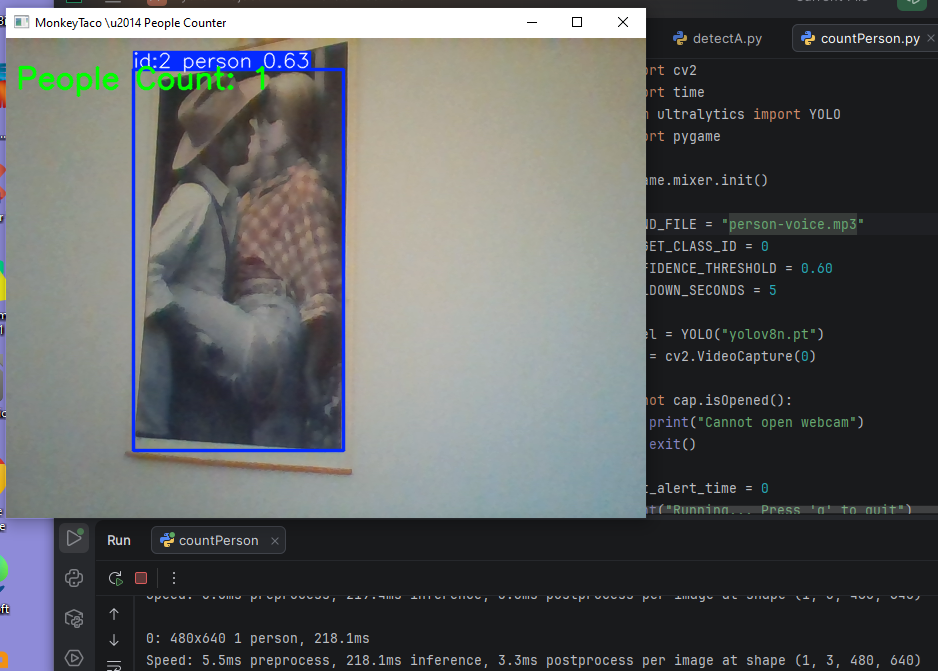
Hit Run. Step in front of the webcam — you’ll see a green bounding box around each person, a persistent tracking ID, and a live count at the top of the screen. When the count exceeds MAX_CAPACITY, a red warning appears.
Our robot, it turns out, also counts people in pictures. A poster on the wall? A photo on your desk? Absolutely a person, as far as it’s concerned. Honest limitation — and honestly, not a bad party trick.
One Bug Worth Knowing About
If you write your own version of this code — or find a similar one online — you’ll likely hit this problem: the program counts correctly once, prints to the Terminal, then exits immediately without any error message.
Here’s what’s happening.
model.track() occasionally throws an exception on the very first frame, before it has established any tracking IDs. That exception crashes the while True loop silently, and the program exits as if nothing went wrong.
The fix is a try/except block:
try:
    results = model.track(frame, persist=True, classes=[TARGET_CLASS_ID])
except Exception:
    results = model(frame, classes=[TARGET_CLASS_ID])  # fallback to regular detection
If tracking fails on a given frame, it falls back to standard detection — no IDs, but no crash either. The loop keeps running.
One more subtle issue: some counting code uses person_count = len(track_ids) to count people. But track_ids only exists when boxes.id is not None — which isn’t guaranteed on the first frame. This can give you a count of zero even when there’s clearly someone standing in front of the camera.
Using len(confidences) instead is more reliable:
confidences = results[0].boxes.conf.cpu().numpy()
person_count = len(confidences)
Both fixes are already in the code above. But it’s worth understanding why — because defensive coding like this becomes second nature the longer you work with hardware and real-time systems.
A Few Things to Try
- Change
MAX_CAPACITYto1and watch the warning trigger the moment a second person enters the frame - Modify the warning text to something more context-appropriate — “Consultation in progress“, “Maximum capacity reached “, or anything that fits your use case
- Swap the audio file for a different message when the room is over capacity
- Lower
CONFIDENCE_THRESHOLDto0.45and observe how many ghost-people appear — useful for understanding why the threshold exists
What Just Happened?
We went from “robot that reacts” to “robot that measures and reacts based on context.” That’s a meaningful step.
The same technology — scaled up with better hardware and multiple cameras — is what powers occupancy monitoring in airports, capacity management in hospitals, and crowd safety systems at large venues. Our version runs on a laptop and took about ten minutes to set up.
Same idea. Very different budgets.
What’s Next?
Counting people who walk past a fixed camera is useful. But what about detecting something more specific — like whether someone has fallen down?
That’s not science fiction. It’s a real, active area of healthcare robotics — and it turns out a laptop webcam and a Python library called MediaPipe can get surprisingly close to a working prototype.
No extra hardware. No extra cost. Just a more interesting problem.
That’s exactly where we’re going next: Part 4 — Fall Detection on a $0 Budget.
MonkeyTaco — Serious Robots. Zero Budget. Maximum Chaos.